- November 21, 2026
- 6 views
- 0 Comments
Google Business Profile Optimization: A Practical Guide for Surat Businesses
LOCAL SEARCH GUIDE · SURAT
A customer searching for a shop in Vesu or a repair service near Adajan needs clear answers: what you offer, whether you are open and how to reach you. Google Business Profile optimization starts with making those answers accurate and useful.
This practical guide explains what Surat businesses can check, what to avoid and how to review enquiries after making improvements. It cannot guarantee a position in Google Maps.
1. Start with eligibility and ownership
Before editing, confirm that the business qualifies for a profile and that its owner controls access. Google generally supports businesses with a customer-facing physical location or businesses that travel to customers. Online-only businesses should check eligibility before creating a listing.
Search for an existing profile before making another one. If someone else manages it, use the ownership process rather than creating a duplicate. Keep the business owner involved in account access and verification.
2. Use the business name customers recognise
Use your real-world business name consistently with your signage and branding. Do not add phrases such as “best in Surat” or a list of services merely to target keywords. Put services, category, opening hours and contact details in their appropriate fields.
Illustrative example: A Vesu boutique called “Example Boutique” should use that name, rather than “Example Boutique Best Designer Sarees Surat Vesu”. This is a naming example, not a client result.
3. Choose accurate categories and useful services
Select the closest available primary category for the core business. Add additional categories only when they genuinely describe what you do. Avoid treating categories as a keyword list.
Describe actual services in plain language. An auto parts business can explain the product types it sells and how customers can check availability. Do not claim every brand or product is in stock if that is not true.
For help reviewing the whole listing, explore our Google Business Profile Audit service. Check the profile first so changes address real gaps.
4. Check the map location, contact details and hours
Confirm the address, entrance and map pin for a shop customers can visit. A service business should represent its service area accurately and follow Google’s address-display rules for its business model. Do not create listings for neighbourhoods where you have no eligible business location.
Illustrative example: A service provider visiting customers in Adajan and Pal can describe the areas it genuinely serves. Adding those names does not guarantee visibility everywhere in Surat.
Update normal hours and special hours before holidays or temporary changes. Check that the phone number works and the website opens the right page. Our Local SEO services can support consistency between your listing and website.
5. Add photos that answer customer questions
Choose current, truthful images of the business. For a storefront, show the entrance and visible signage so first-time visitors can recognise it. Add interior and product photos when relevant. Service businesses can show permitted work examples without exposing customer information.
- Use clear, well-lit photos that represent the actual business.
- Avoid stock photos presented as your team, premises or completed work.
- Get permission before publishing identifiable customers or private sites.
- Replace outdated images when the premises or offering changes.
A Udhna workshop, for example, could show its approach road, entrance and a safe view of its workspace. This is a suggested photo plan, not a claim about any specific workshop.
6. Request genuine reviews and respond helpfully
Invite customers to share an honest account of their experience. Do not buy reviews, offer discounts for them or ask only satisfied customers while filtering everyone else out. Avoid pressuring customers to include particular keywords or a five-star rating.
Thank reviewers and address concerns politely. Move private order or contact details out of public replies. See our Google Reviews Management service for support with a consistent response workflow.
7. Keep updates useful and the website relevant
Use available update features for timely information, such as an actual service change, product introduction or event. Check the dates and destination links. Posting more often is not a guaranteed ranking shortcut.
Link the profile to a useful website destination with matching business details, clear services and an easy contact route. If you serve distinct locations, build genuinely useful local landing pages rather than copying the same text and changing the area name.
8. Measure actions, then review enquiry quality
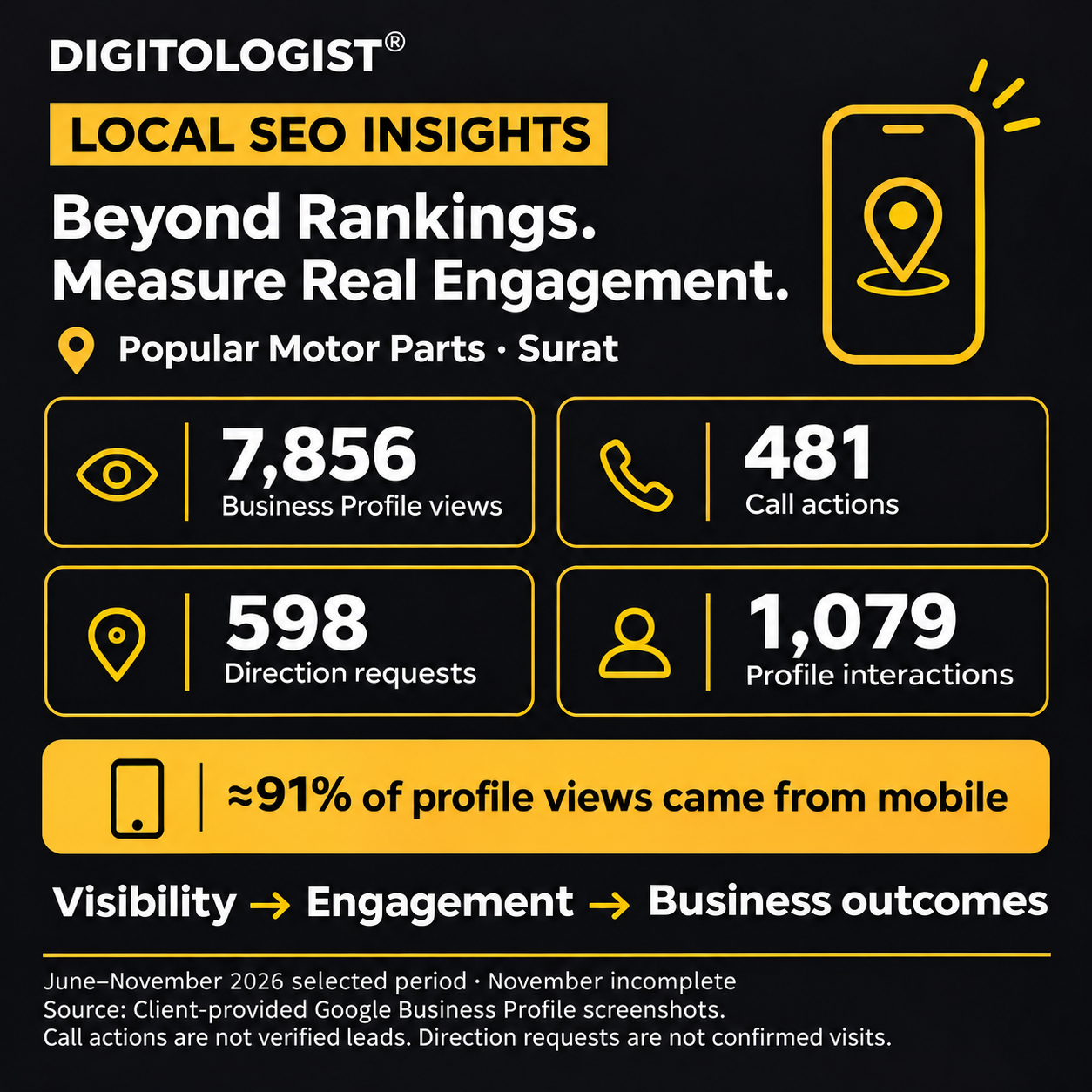
Record a baseline before editing: the reporting period, available profile interactions and the number of relevant enquiries your team receives. Compare similar periods and note seasonal changes. Call actions are not automatically completed calls or qualified leads; direction requests are not proof of store visits.
Ask your team which enquiries matched your services. If people reach the website but cannot find opening hours or the right contact option, improve that journey. Avoid attributing every change to one profile edit.
A practical 30-day checklist
- Week 1: Check ownership, eligibility, duplicates, name, category, address and contact details.
- Week 2: Improve service descriptions, website destination and current business photos.
- Week 3: Introduce a neutral review request and response routine.
- Week 4: Review available actions, enquiry quality and any information customers still struggle to find.
This is a suggested work plan, not a promise of results within 30 days.
Frequently asked questions
Can optimization guarantee first place in Google Maps?
No. Google describes local results using relevance, distance and prominence or popularity. Accurate information helps customers, but distance and competition also matter. You cannot pay Google for a better organic local position.
Should I add Surat to my business name?
Only if it is genuinely part of the business’s real-world name. Keep location and service details in the appropriate fields.
How often should I review the profile?
Check it whenever hours, contact details or services change. A regular monthly review is a practical starting routine; seasonal businesses may need more frequent checks.
Need a clearer starting point?
Digitologist can review your profile and website together, identify gaps and prioritise practical updates. Discuss your Google Business Profile with us. Bring the profile link, website and the services you most want customers to understand.
Sources and editorial note
Prepared by Digitologist · 21 November 2026. Local examples are illustrative. Google’s interface and available features can vary by category and region.